Адаптивный круиз-контроль
The Adaptive Cruise Control (ACC) system is designed to maintain a gap from the vehicle ahead, or a set road speed if there is no slower vehicle ahead. A speed may be set at between 32 km/h (20 mph) and 180 km/h (112 mph). The set speed will be displayed in the Message centre.
The system acts by regulating the speed of the vehicle, using engine control and the brakes.
ACC is not a collision warning or avoidance system. Additionally, ACC will not react to:
- Pedestrians or objects in the roadway.
- Oncoming vehicles in the same lane.
The ACC system uses a radar sensor, which projects a beam directly forward of the vehicle, to detect objects ahead.
The radar sensor is mounted at the front of the vehicle, behind the duct in the lower cooling aperture, to provide a clear view forward for the radar beam.
- Use ACC only when conditions are favourable, i.e., main roads with traffic moving in lanes.
- Do not use during abrupt or sharp turns, e.g., traffic islands, junctions, areas with many parked vehicles or areas shared with pedestrians.
- Do not use in poor visibility, specifically fog, heavy rain, spray or snow.
- Do not use on icy or slippery roads.
- It is the driver's responsibility to stay alert, drive safely and be in control of the vehicle at all times.
- Keep the front of the vehicle free from dirt, metal badges or objects, including vehicle front protectors, which may prevent the radar sensor from operating.
USING ACC
The system is operated by controls mounted on the steering wheel. The driver can also intervene at any time, by the use of the brake or accelerator pedals.
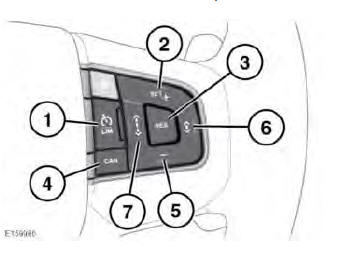
- LIM: Press to switch between ASL and ACC. The ACC warning lamp will illuminate to confirm ACC is operational. See 63, CRUISE CONTROL (GREEN).
- SET +: Press to set the vehicle's current speed as the set speed. While ACC is enabled, further pressing of the button will raise the set speed above the vehicle's current speed. The speed of the vehicle will gradually increase to reach the new set speed.
- RES: Press to resume the ACC set speed after it has been disengaged.
- CAN: Press to cancel but retain the set speed in the memory.
- Press (-) to decrease the set speed.
The speed of the vehicle will gradually decrease to reach the new set speed.
- Press to decrease the Follow mode gap.
- Press to increase the Follow mode gap.
- Entering follow mode
- Changing the follow mode set gap
- Resuming the speed and follow mode
- Detection beam issues
- Advanced emergency brake assist
 Cruise controlEntering follow mode

Вход в режим следования
When in Follow mode, the vehicle may not decelerate automatically to a stop, nor will the vehicle always decelerate quickly enough to avoid a collision.
Once a set speed has been selected, the driver can release the accelerator and the set road speed will be maintained.
If a vehicle ahead enters the same lane, or a slower vehicle is ahead in the same lane, your vehicle's speed will adjust automatically until the gap to the vehicle ahead corresponds to the gap setting. The vehicle is now in Follow mode.
The Follow mode warning lamp will illuminate in the Instrument panel, to confirm Follow mode is operational
The Message centre will display the gap set in the form of a vehicle with a varying number of bars in front of it.
The vehicle will then maintain the constant time gap to the vehicle ahead until:
- The vehicle ahead accelerates to a speed above the set speed.
- The vehicle ahead moves out of lane or out of view.
- A new gap setting is chosen.
If necessary, the vehicle's brakes will be automatically applied, slowing the vehicle and maintaining the gap to the vehicle in front.
The maximum braking which is applied by ACC is limited and can be overridden by the driver applying the brakes, if required.
Note: Driver braking will cancel ACC.
If the ACC system predicts that its maximum braking level will not be sufficient, then an audible warning will sound while the ACC system continues to brake. DRIVER INTERVENE will be displayed in the Message centre. Take immediate action.
When in Follow mode, the vehicle will automatically return to the set speed when the road ahead is clear, for instance when:
- The vehicle ahead accelerates to a speed above the set speed, or changes lane.
- You change lane to either side or enter an exit lane.
The driver should intervene, if appropriate.
If a direction indicator is used, ACC will reduce the gap to the vehicle ahead so as to respond more quickly to the anticipated manoeuvre. If a manoeuvre is not actioned, the previous gap will be restored after a few seconds. Enhanced response may not occur if ACC detects that it is inappropriate, i.e., you are already too close to the vehicle ahead or you are already in another lane.
FOLLOW MODE OFF
Follow mode can be disabled by pressing and holding the gap decrease button on the steering wheel, until the Follow mode OFF icon is displayed in the Message center
The Follow mode (amber) warning lamp will extinguish.
Note: Follow mode ON is the default setting for ACC, hence Follow mode OFF will be automatically cancelled if ACC is not used for a prolonged period of time, and when the ignition is switched off.
To switch Follow mode back ON, briefly press either of the Follow mode gap increase/decrease buttons. The previous gap settings will resume and the Follow mode (amber) warning lamp will illuminate.
Adaptive cruise controlChanging the follow mode set gapИзменение дистанции в режиме следования
It is the driver's responsibility to select a gap appropriate to the driving conditions.
Four gap settings are available. The selected gap setting is displayed in the Message centre when the gap adjustment buttons are operated.
Each gap is indicated by an additional bar in front of the vehicle icon in the Message centre. After the ignition is switched on, the default gap (gap 3) will be automatically selected ready for ACC operation.
If the Terrain response, Grass/Gravel/Snow mode is selected, then the longest gap (gap 4) will initially be selected.
OVERRIDING THE SPEED AND FOLLOW MODE
Whenever the driver is overriding Adaptive Cruise Control (ACC) by pressing the accelerator pedal, ACC will not automatically apply the brakes to maintain separation from any vehicle ahead.
The set speed and gap can be overridden by pressing the accelerator pedal while cruising at a constant speed or in Follow mode. If the vehicle is in Follow mode when the ACC is overridden, the Follow mode warning lamp will extinguish and CRUISE OVERRIDE will be displayed in the Message centre. When the accelerator is released, the ACC function will operate again and the vehicle's speed will decrease to the set speed, or a lower speed if Follow mode is active.
QUEUE ASSIST
Queue assist is an enhancement of Adaptive Cruise Control (ACC) and, when active, will follow a vehicle ahead to a standstill. It is intended for use in lines of traffic on major roads, where minimal steering is required.
If a vehicle ahead slows to a halt, Queue assist will bring the vehicle to a stop and hold it stationary.
While the vehicle is held stationary, Queue assist will request the Electric Parking Brake (EPB) to apply if:
- The driver cancels Queue assist.
- The vehicle is stopped for more than three minutes.
- Driver intention to exit the vehicle is detected.
- A malfunction is detected.
As the vehicle ahead moves away, a brief press on the accelerator will resume ACC operation.
At very low speed, Queue assist may stop for stationary objects, e.g., when the vehicle ahead changes lane to reveal a stationary object. The vehicle's radar cannot always distinguish between a stationary vehicle and a fixed object like a road sign, drain cover or temporary barrier. This may cause unexpected braking or cancellation, and the driver should intervene if appropriate.
ACC AUTO OFF
ACC will disengage, but not clear the memory when:
- The CANCEL button is pressed.
- The brake pedal is pressed.
- Neutral (N) is selected.
- Dynamic Stability Control (DSC) activates.
- Electronic Traction Control (ETC) activates.
- Hill Descent Control (HDC) is selected.
- Certain Terrain response modes are selected, i.e., Sand and Mud-ruts.
- The difference between the vehicle's current speed and the set speed is too great.
- The accelerator pedal is used to accelerate beyond the set speed for too long a period, i.e., more than 5 minutes.
- Maximum vehicle speed is reached.
- Maximum engine revolution speed is reached. 5 000 rpm for a diesel engine and 7 000 rpm for a petrol engine.
- The radar sensor is blocked by mud, snow or ice.
ACC will disengage, and clear the memory when:
- The ignition system is switched off.
- A fault occurs in the ACC system.
Entering follow modeResuming the speed and follow modeВозобновление скорости и режима следования
RES should only be used if the driver is aware of the set speed and intends to return to it.
By pressing the RES button after ACC has been cancelled (e.g. after braking), ACC will become active again provided that the set speed memory has not been erased. The original set speed will be resumed (unless a vehicle ahead causes Follow mode to become active) and the set speed will be displayed in the Message centre. Queue assist may be resumed above 10 km/h (6 mph).
Note: When the set speed is resumed, the rate of acceleration is influenced by the previously set Follow mode gap. A closer set gap will promote greater acceleration.
Note: When resuming a set speed while in a curve, acceleration is reduced. A more severe curve will reduce acceleration further. Remember that ACC and Queue assist are primarily for use when minimal steering is required.
HINTS ON DRIVING WITH ACC
During some situations, ACC may provide the driver with an indication that intervention is required.
An audible alarm will sound, accompanied by the message DRIVER INTERVENE in the Message centre, if ACC detects:
- A failure has occurred while the system is active.
- That using maximum ACC braking only is not sufficient.
Note: ACC only operates when the gear selector is in Drive (D) or Sport (S).
Note: When ACC is engaged, the accelerator pedal rests in the raised position. Fully release the pedal to allow normal ACC operation.
Note: When braking is applied by the ACC system, the vehicle's brake lamps will illuminate.
Note: When Intelligent stop/start is fitted, it may operate during a Queue assist stop.
Press the accelerator pedal for longer than normal to restart the engine and move off.
Changing the follow mode set gapDetection beam issuesПроблемы с лучом датчика

Detection issues can occur:
- When driving on a different line to the vehicle in front.
- When a vehicle edges into your lane.
The vehicle will only be detected once it has moved fully into your lane.
- There may be issues with the detection of vehicles in front, when going into and coming out of a bend.
- When moving around a stationary vehicle. This may cause uncertainty as to which vehicle should be followed.
- When the vehicle ahead turns out of your lane. This may cause uncertainty as to which vehicle should be followed.
In these situations Adaptive Cruise Control (ACC) may operate unexpectedly. The driver should stay alert and intervene if necessary.
ACC MALFUNCTION
If a fault occurs while ACC, or Follow mode is operational, ACC will switch off and cannot be used until the fault is cleared. The message DRIVER INTERVENE is displayed briefly in the Message centre and is then replaced by the message CRUISE NOT AVAILABLE.
If a fault with ACC, or any related system, occurs at any other time, the message CRUISE NOT AVAILABLE will be displayed. It will not be possible to activate ACC in any mode.
Accumulations of dirt, snow or ice on the radar sensor or cover may inhibit ACC operation. Fitting of a vehicle front protector or metallised badges may also affect ACC operation.
If this occurs in ACC cruise/Follow mode, the audible alarm sounds and the message DRIVER INTERVENE is displayed briefly.
The message RADAR SENSOR BLOCKED will then be displayed.
Note: The same messages may also be displayed while driving on open roads with few objects for the radar to detect.
Clearing the obstruction allows the system to return to normal operation. If the obstruction is present when ACC is inactive (e.g., on initial starting or with ACC switched off), the message RADAR SENSOR BLOCKED will be displayed.
Tyres, other than those recommended for your vehicle, may have different circumferences. This can affect the correct operation of ACC.
FORWARD ALERT FUNCTION
- The system may not react to slow moving vehicles.
- Forward alert uses the same radar sensor as Adaptive Cruise Control (ACC). The same performance limitations apply.
Forward alert can be enabled/disabled, via Driver Assistance or Driving features in the Instrument panel menus.
The warning lamp in the Instrument panel illuminates when Forward alert is enabled.
Forward alert provides limited detection and warning of objects close ahead while the vehicle is moving forwards. If a vehicle or object ahead is within the user defined sensitivity area, a warning tone will sound and the FORWARD ALERT message will be displayed in the Message centre.
Emergency Brake Assist (EBA) will be activated.
The driver must take appropriate action immediately.
Sensitivity of the function can be adjusted only when ACC is disengaged. Adjust as follows:
- Using the steering wheel ACC buttons, press the gap decrease button to display the current setting in the Message centre and then press again to decrease the sensitivity of the alert.
- Press the gap increase button to display the current setting in the Message centre and then press again to increase the sensitivity of the alert.
FWD ALERT <----> is displayed in the Message centre.
Note: The Forward alert set gap is retained when the ignition is switched off.
Resuming the speed and follow modeAdvanced emergency brake assistРасширенный ассистент экстренного торможения
- The system may not react to slow moving vehicles and will not react to stationary vehicles or vehicles travelling in the opposite direction.
- Warnings may not appear if the distance to the vehicle ahead is very small or if steering wheel or pedal movements are large (e.g., to avoid a collision).
- The system utilises the same radar sensor as Adaptive Cruise Control (ACC) and Forward alert - the same limitations of performance apply.
Advanced emergency brake assist is only fitted on vehicles with ACC, and will function even if ACC and Forward alert are switched off.
Advanced emergency brake assist is available at speeds above approximately 7 km/h (5 mph). It improves braking response during emergency braking, when a moving vehicle is detected close ahead.
If the risk of a collision increases after the FORWARD ALERT warning is displayed, Advanced emergency brake assist is activated. The brakes are automatically applied gently in preparation for rapid braking (this may be noticeable). If the brake pedal is then pressed quickly, full braking is implemented, even if only light pressure is applied to the pedal.
Note: Braking performance will only be improved if the driver applies the brakes.
If there is a fault with the system, FORWARD ALERT UNAVAILABLE is displayed in the Message centre. The vehicle can still be driven and the braking system will still operate, but without Advanced emergency brake assistance.
Consult a Retailer/Authorised Repairer to have the fault rectified.
INTELLIGENT EMERGENCY BRAKING
- The system may not react to slow moving vehicles.
- The system will not react to stationary vehicles or vehicles that are not travelling in the same direction as your vehicle.
- Warnings and automatic braking may not occur if the distance to the vehicle ahead is very small, or if the steering wheel and pedal movements are large (e.g., to avoid a collision).
- Intelligent emergency braking uses the same radar sensor as Adaptive cruise control and Forward alert. The same limitations of performance apply.
Intelligent Emergency Braking (IEB) is only fitted on vehicles with Adaptive Cruise Control (ACC), and will function even if ACC and Forward alert are switched off.
The purpose of the IEB feature is to reduce the impact speed with a slower vehicle ahead when a collision becomes unavoidable.
The IEB feature will be available at all speeds.
If an imminent risk of collision occurs, an audible warning is given. If a collision becomes unavoidable, IEB will apply the brakes at up to maximum pressure. After IEB has activated, IEB System Was Activated is displayed in the Message centre and the system is inhibited from further operation until reset by a Retailer/ Authorised Repairer.
Note: The distance required to slow or stop the vehicle is dependent on the condition of the vehicle's tyres and the current road surface.
If the radar sensor is blocked by snow or heavy rain for example, or there is a fault with the system, IEB Not Available is displayed in the Message centre. The vehicle can still be driven and the braking system will still operate, but without IEB.
If the radar sensor is not considered to be blocked, consult a Retailer/Authorised Repairer.
Detection beam issuesProgress control system